Banks ask for a recent EPF statement when you apply for a home loan, credit card, or personal loan. You'll also need your MyKad and salary slips. In the past, you had to queue at an EPF office just to print a statement, but now you can register, log in, and download it yourself through the KWSP i-Akaun app on Google Play or the Apple App Store, or through the i-Akaun (Member) website.
You can register through the app if you're a Malaysian citizen with a MyKad, or a PR with a MyPR. If you don't have either one, you'll need to register at an EPF office in person.
What You'll Need Before You Register
You'll need three things before you can register:
- Your MyKad or MyPR. A photo or photocopy won't work.
- A mobile number that matches EPF's records. If it has changed since your last EPF transaction, fix this at a branch or Self-Service Terminal first. You need to receive an SMS code to register.
- A phone with a front camera. Use it in a well-lit room with a stable internet connection.
If you've never worked in Malaysia and never made a voluntary contribution, you may not have an EPF member number yet. Malaysian citizens and PRs are automatically registered once their employer makes their first EPF payment. If you're self-employed, or need to register on your own, you can also do this through the app.
How To Register As An EPF Member
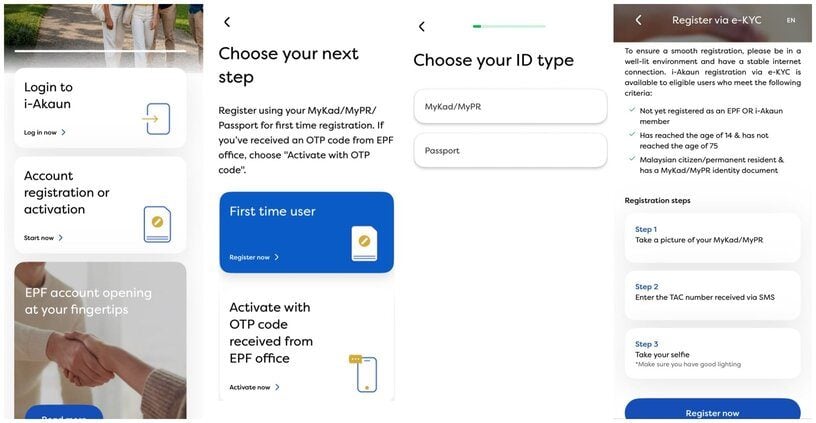
If you're a Malaysian citizen with a MyKad, or a PR with a MyPR, you can do this whole step in the app:
- Download the KWSP i-Akaun app from the App Store, Google Play, or Huawei AppGallery.
- Open the app and tap "Account registration or activation", then "First time user".
- Choose your ID type.
- Take a photo of the front of your MyKad or MyPR.
- Enter your mobile number. EPF will send you a code by SMS. Enter that code.
Once you finish these steps, you're registered. You may proceed to register and activate your i-Akaun (Member).
If the chip on your ID can't be read, you'll need to register in person instead.
How To Activate i-Akaun (App)
With your EPF member registration done, activate your i-Akaun so you can log in and use it:
- Take a selfie inside the circle shown on screen.
- Create a user ID and password.
- Pick a secure image and set a secret phrase. You'll use these to prove it's you in the future.
If The App Doesn't Work
You can also register at an EPF Self-Service Terminal (SST), available at EPF offices and around 90 other locations nationwide, including selected shopping malls and Urban Transformation Centres (UTC). Insert your MyKad or MyPR and verify your thumbprint, then follow the on-screen steps to enter your mobile number and email. Review and confirm your personal details. Your EPF member number will be displayed on the screen, and a confirmation email will be sent to you.
If you're unable to register through the app or SST, you can register at an EPF office counter. It works the same way as the SST for identity checks. Bring your MyKad or MyPR, and staff will check your ID and verify your thumbprint before giving you your EPF member number on the spot.
Non-citizens need a valid passport, work permit, and a completed KWSP 3 form. Malaysian and PR applicants need the same form if their MyKad chip can't be read or thumbprint verification fails. A member number isn't a working i-Akaun login. You'll still need to register separately through the app, at any SST, or via OTP at the counter.
How To Log In To i-Akaun
Once you're registered, log in through the app or the i-Akaun (Member) website using the user ID and password you made. If you forget either one, you can reset them in the app using an SMS code, and you won't need your secure image or secret phrase this time.
If the code doesn't arrive, your mobile number on file is probably wrong, and you'll need to fix it at an EPF branch or Self-Service Terminal.
How To View And Download Your EPF Statement
Once you're logged in:
- Open the app and go to the Home tab.
- Tap the download icon on the account summary.
- Pick the year you need, then tap "Download statement".
- Your statement will show on screen. Tap the share icon to save it to your phone.
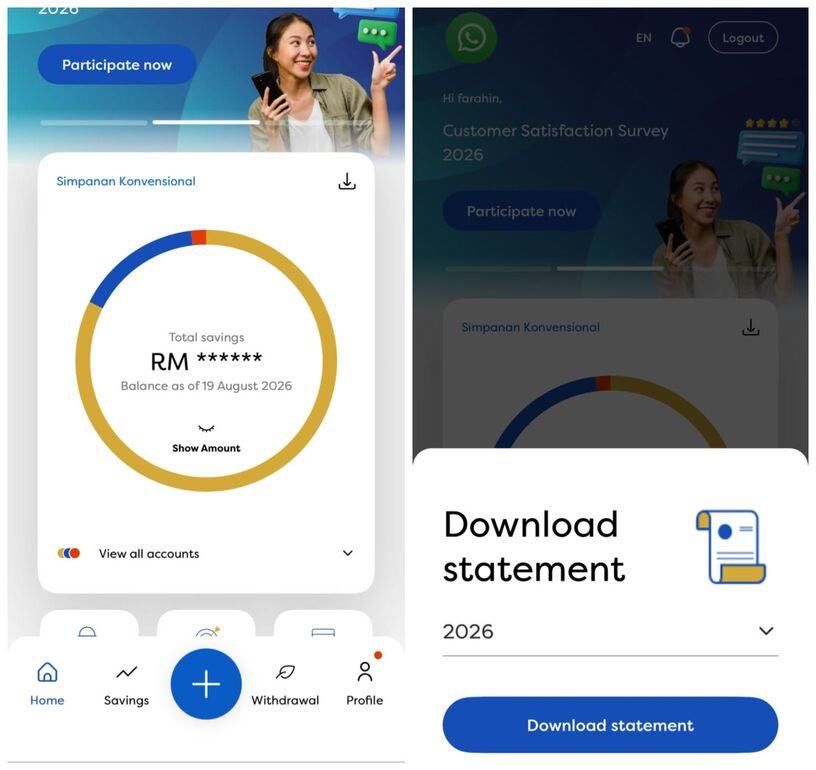
You can also get there through the Savings tab. Tap "View Details", then the download icon, then pick your year the same way.
You can only get statements for the last six years online, including this year. So in 2026, that means 2021 to 2026. If you need an older statement, you'll need to apply in person at an EPF branch. Bring a copy of your ID and a supporting letter, such as one from LHDN, SOCSO, or a court order.
Your statement splits your savings into three accounts. Since May 2024, EPF has split contributions this way: Akaun Persaraan gets 75%, Akaun Sejahtera gets 15%, and Akaun Fleksibel gets 10%. On a RM1,000 monthly contribution, that's RM750 into Akaun Persaraan, RM150 into Akaun Sejahtera, and RM100 into Akaun Fleksibel.
If you're an older member, don't be surprised if Akaun Fleksibel shows a smaller balance than your other accounts. It started at RM0 for everyone under 55 when it launched. To learn what each account is for, read A Guide To EPF Accounts And What's New In 2026.
Banks differ on whether they want your full statement or just the latest year for a loan or credit card application. Check with your bank first.
Which Registration Route To Use
The route that works for you depends on whether the app's e-KYC check succeeds.
| Method | Requirements | Best for |
| e-KYC via app | Original MyKad/MyPR, front camera, stable internet, well-lit space | Skip the office if you're a Malaysian citizen or PR |
| Self-Service Terminal | Visit an EPF office or SST location | Use this if your e-KYC scan fails, or you'd rather register in person |
| Branch counter | Original MyKad/MyPR, or passport and KWSP 3 form for non-citizens (KWSP 3 also required for citizens/PRs if the chip can't be read) | Your route if you're not a Malaysian citizen or PR, or your MyKad chip can't be read |
Frequently Asked Questions
What is i-Akaun?
i-Akaun is EPF's official app and website for members. You can check your balance, see your contribution history, download statements, manage your nomination, and apply for withdrawals, all without visiting an EPF office.
Can I register for i-Akaun without a smartphone?
You can register at an EPF Self-Service Terminal instead, which verifies you by thumbprint rather than the app's e-KYC. If you can't complete e-KYC, the SST can also activate your i-Akaun in the same visit.
What if my registered mobile number is outdated?
You'll need to update it in person at a branch or Self-Service Terminal. Both registration and login need an SMS code, so this can't be fixed online.
Does my EPF statement show all three accounts?
Yes. Statements from May 2024 onwards show Akaun Persaraan, Akaun Sejahtera, and Akaun Fleksibel separately, along with each account's contribution and dividend history.
Is there a fee to register for i-Akaun or download a statement?
No. Registration, login, and statement downloads are all free through the app and the website.
What if I still can't access my statement online?
Call the EPF Contact Management Centre at 03-8922 6000, or submit an enquiry through the EPF website's contact form. An EPF Self-Service Terminal is the fastest option because it can email your statement to you almost instantly. A branch visit also lets you request a printed copy directly.