Alex Cheong Pui Yin
Previously covered recruitment-related stories and had a short stint as a copywriter for the property industry. She subsequently developed an interest in investment and robo-advisors.

19th April 2024 - 3 min read
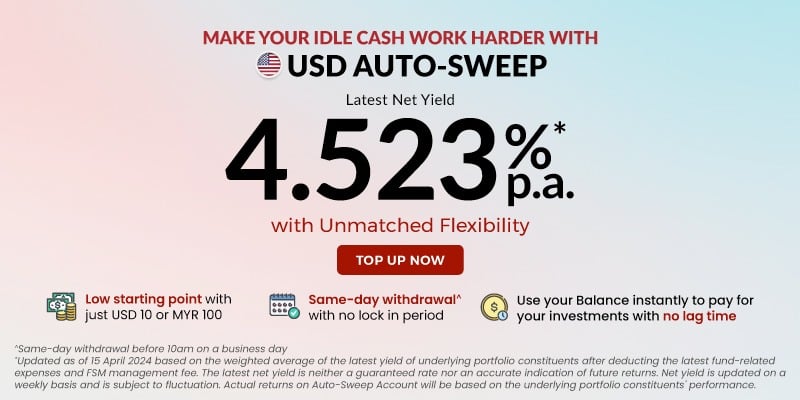
FSMOne has unveiled a new offering called FSMOne USD Auto-Sweep, which is described as “a USD cash management solution” that lets investors earn an attractive yield of 4.523% p.a. (as of 15 April 2024) on their idle cash.
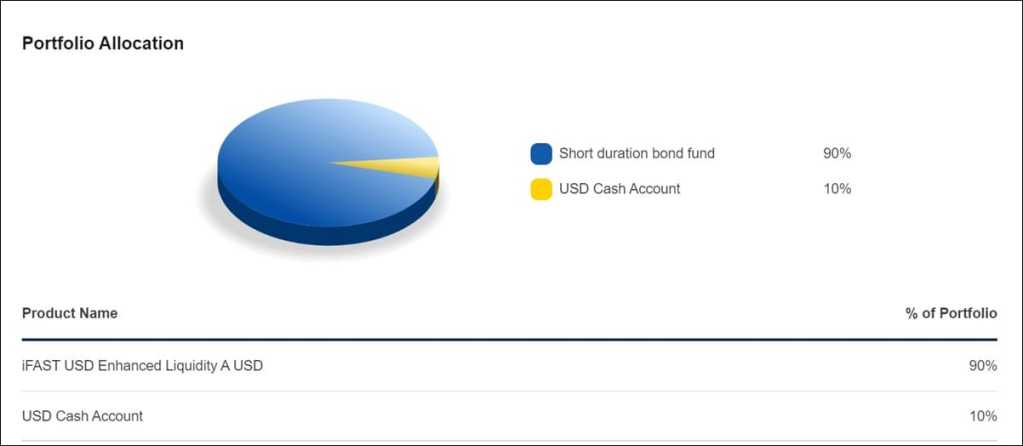
According to FSMOne, the new account will serve as an alternative parking facility to the FSMOne Multi-Currency Cash Account, where it automatically “sweeps” your extra cash in excess of US$10 that is accumulated in a single day (such as sales proceeds, bond maturities, coupons, and dividends) into the account. This amount will then be invested into the following conservative products to help you gain some earnings while you seek or wait for other better opportunities:
FSMOne further highlighted that the new account has a low entry barrier as investors can start with just US$10 or RM100; similarly, subsequent top-up amounts also start with a minimum of US$10 or RM100. Meanwhile, the minimum withdrawal amount is set at US$10.
More importantly, though, is the fact that FSMOne USD Auto-Sweep does not have a lock-in period, which means that you can make a withdrawal and receive your proceeds in your cash account on the same day. This is provided that you submit your request before 10am on a business day.
On top of that, you can also use your FSMOne USD Auto-Sweep balance to instantly pay for your preferred investments on FSMOne should you happen to come across an exciting opportunity, to be processed on the same day. Of course, similar to same-day withdrawals, you’re also required to place your buy or sell orders before the cut-off time for this to be possible (cut-off time varies depending on products).
In terms of charges, there are no sales or platform fees to use FSMOne USD Auto-Sweep, but do note that there is a management fee of 0.05% every quarter.
If you’d like to tap into this new offering, you can opt in and activate it at any time. Here’s how you can do it, depending on which FSMOne platform you’re on:
It is also possible for you to activate Auto-Sweep for selected FSMOne investment accounts if you have multiple accounts under your name.
For context, FSMOne USD Auto-Sweep is the first Auto-Sweep offering to be introduced in Malaysia. Meanwhile, Singaporean FSMOne investors have a wider Auto-Sweep offering; they are also able to access SGD Auto-Sweep and CNH Auto-Sweep accounts on top of the USD Auto-Sweep account.
Previously covered recruitment-related stories and had a short stint as a copywriter for the property industry. She subsequently developed an interest in investment and robo-advisors.


Comments (0)