Apple Pay launched in Malaysia back in 2023. Most major banks now support it, though acceptance varies across merchants. This guide covers which banks work with Apple Pay, where you can use it, and whether those tap-to-pay transactions are actually secure.
Apple Pay is a digital wallet that lets you store your credit and debit cards in your iPhone’s Wallet app. Instead of carrying physical cards, you tap your phone at payment terminals to complete transactions. Your existing cards work the same way through Apple Pay, earning the same rewards and appearing on the same bank statements.
Which Malaysian Banks Support Apple Pay?
Most major Malaysian banks now support Apple Pay, though there are still some notable gaps.
Banks that support Apple Pay: Alliance Bank, Maybank, RHB, HSBC, Standard Chartered, Ambank, Hong Leong Bank, CIMB, and Ryt Bank all work with Visa and Mastercard credit and debit cards.
Banks with limited or no support: Bank Islam, Affin Bank, Public Bank, and UOB, don’t fully support Apple Pay yet.
If your card isn’t on the supported list, you won’t be able to add it to Apple Pay. Contact your bank directly to find out when they might add support, though banks rarely commit to specific timelines.
How To Set Up Apple Pay On Your iPhone
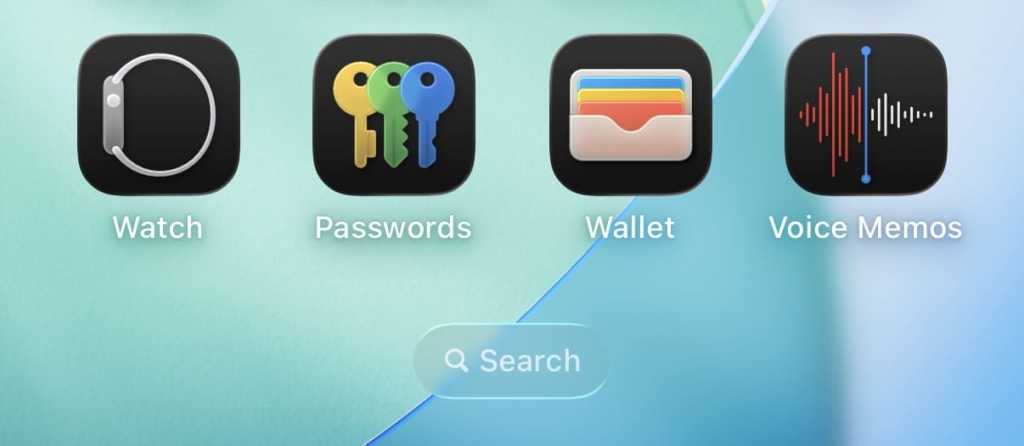
The setup process takes about two minutes. The Wallet app comes pre-installed on all iPhones – look for the black icon with a wallet design on your home screen. If you can’t find it, swipe down and use the search function to type “Wallet.”
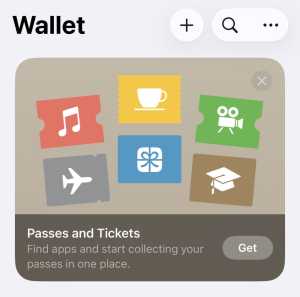
Open the Wallet app and tap the plus sign (+) in the top right corner.
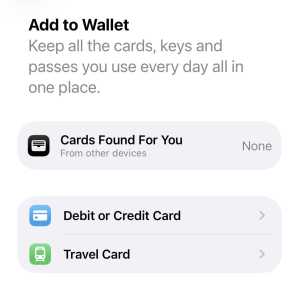
Select “Debit or Credit Card” from the options that appear.
You can either scan your card with your camera (hold your card flat against a solid background) or tap “Enter Card Details Manually” if the camera scan isn’t working.
Your bank will verify the card through SMS with a one-time password. Some banks might ask you to call their customer service line for verification. Once verified, your card appears in the Wallet app and you can start using it immediately. You can add up to 12 cards, though most people stick with their primary credit or debit card.
If you’ve added multiple cards, the first one becomes your default. You can change this by pressing and holding a different card in the Wallet app and dragging it to the front. When making a payment, you can switch cards by tapping your default card before authenticating with Face ID.
Where Can You Actually Use Apple Pay In Malaysia?
Any merchant that accepts contactless Visa or Mastercard payments can accept Apple Pay. The terminal doesn’t need to specifically support Apple Pay because these transactions work exactly like contactless card taps.
Places that accept Apple Pay:
Major supermarkets like Tesco, AEON, and Village Grocer
Convenience stores, including 7-Eleven, KK Mart, and 99 Speedmart
Petrol stations such as Petronas and Shell
Pharmacies like Guardian and Watsons
Fast food chains, including McDonald’s, KFC, and Starbucks
Shopping malls with contactless terminals
Ride-hailing apps like Grab
Places that might not accept it:
Small independent shops and restaurants
Night markets and street food stalls
Some older cafes
Merchants without contactless terminals
The acceptance gap is about whether a merchant has invested in contactless payment terminals, not about Apple Pay specifically.
What If A Merchant Says They Don’t Accept Apple Pay?
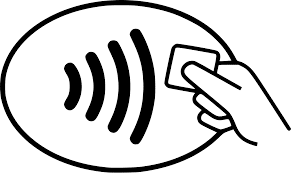
This happens because staff don’t realise their terminal supports it. If you see a contactless payment symbol on their card machine (it looks like a sideways WiFi symbol), their terminal can handle Apple Pay.
Tell them to select the credit or debit card option and hold your phone near the card reader. Most will be surprised when it works. Some terminals require them to select “contactless” or “tap” first. If the terminal genuinely doesn’t have contactless capabilities, you’ll need to use your physical card.
Does Apple Pay Work With Credit Card Rewards?
Yes, Apple Pay transactions count exactly the same as physical card transactions for rewards purposes. If your credit card gives you 5% cashback on petrol purchases, you’ll still get that 5% when you pay with Apple Pay at Petronas.
The transaction appears on your bank statement with the same merchant code as a physical card payment, so rewards, cashback, and points all work normally. Your bank doesn’t distinguish between Apple Pay and physical card usage.
There’s one exception: some credit cards offer specific Apple Pay promotions, like bonus cashback for Apple Pay transactions during certain periods. Check your bank’s credit card promotions to see if there are any Apple Pay-specific deals. If you’re shopping around for a card with better rewards, compare credit cards to find one that suits your spending habits.
Is Apple Pay Safe? What Happens If You Lose Your Phone?
Apple Pay uses tokenisation, which means your actual card number never gets stored on your phone or transmitted to merchants. Your bank creates a unique Device Account Number that’s encrypted and stored in your phone’s secure element. When you make a payment, your phone sends this Device Account Number and a one-time transaction code that only works once.
If your phone gets stolen, your cards are safer than if someone stole your wallet. Apple Pay requires Face ID, Touch ID, or your passcode for every transaction. You can’t tap to pay without authentication, unlike contactless physical cards that work without verification for small amounts.
You can remotely disable Apple Pay through Find My iPhone. Log in to iCloud.com, select your device, and put it in Lost Mode. This immediately disables Apple Pay and prevents any transactions. If you want to completely remove all your cards, use the “Erase Device” option.
Why Is My Card Being Declined On Apple Pay When It Works Physically?
Your bank has blocked the transaction for fraud prevention. Banks sometimes flag Apple Pay transactions as suspicious, especially for first-time use or large purchases. Check your banking app for any security alerts or notifications about blocked transactions. Call your bank’s customer service number and tell them you want to use Apple Pay. They can note this on your account and try again.
The merchant’s terminal has lower limits. Some contactless terminals have daily or per-transaction limits below what your card allows. If you’re buying something expensive, the terminal might decline it even with sufficient credit. Ask to split the payment or use your physical card.
Your phone’s date and time settings are wrong. Apple Pay uses your device’s clock to generate transaction codes. Go to Settings > General > Date & Time and make sure “Set Automatically” is turned on.
You’re travelling overseas. If you have a Malaysian card and you’re using Apple Pay abroad, your bank might decline the transaction. Contact your bank before travelling to inform them.
Your card’s contactless feature is disabled. Some banks require you to activate contactless payments separately. Log into your mobile banking app and check if there’s a contactless payment toggle that needs switching on.
Common Questions About Apple Pay In Malaysia
Can I use Apple Pay on my Apple Watch? Yes. Set it up through the Watch app on your iPhone. Payments work independently once configured. You’ll enter your Apple Watch passcode when you put it on each day, then pay by double-clicking the side button.
Does Apple Pay work with public transport? Not yet with Touch ‘n Go or Rapid KL directly. You still need your physical Touch ‘n Go card or the eWallet app. Apple Pay works for retail purchases but hasn’t integrated with public transport systems.
Are there transaction limits? This depends on the merchant’s terminal. Most contactless terminals have a limit of RM250 per transaction. Higher amounts require you to enter your card PIN on the terminal.
Can I use Apple Pay for online shopping? Yes. Many Malaysian online retailers and apps support Apple Pay as a checkout option. Look for the Apple Pay button during checkout in Safari or in apps.
Should You Actually Use Apple Pay?
If your bank supports it and you regularly shop at places with contactless terminals, Apple Pay is more convenient than carrying cards. The security benefits are genuinely better than physical card taps, and transaction speeds are about the same.
The main drawback is acceptance. While most major retailers work with it, you’ll still encounter situations where you need your physical card. Keep your wallet with you until contactless payment acceptance becomes truly universal in Malaysia.
For credit card rewards, there’s no downside. Apple Pay transactions count the same as card swipes, and you might find occasional Apple Pay-specific promotions from your bank that give you extra cashback.
The setup takes two minutes and costs nothing, so there’s no reason not to add your card and try it out. If you find yourself using it regularly, you can add more cards. If you don’t, the card just sits in your Wallet app until you need it.
Follow us on our official WhatsApp channel for the latest money tips and updates.
As a creative content writer, Eloise has covered finance, business, lifestyle topics, and even moonlights as a singer-songwriter outside of RinggitPlus. Her current interests are learning the best ways to optimise spending and credit card hacks to gain more airline miles.
51vote
Article Rating
SHARE
About THE AUTHOR
Eloise Lau
Eloise Lau
As a creative content writer, Eloise has covered finance, business, lifestyle topics, and even moonlights as a singer-songwriter outside of RinggitPlus. Her current interests are learning the best ways to optimise spending and credit card hacks to gain more airline miles.
You’re right, and we apologise for the error. We’ve corrected the article to remove UOB, Public Bank, and Alliance Bank from the supported list. Thank you for pointing this out.
Anonymous
11 months ago
Since when did CIMB, Public Bank, Hong Leong Bank and UOB support Apple Pay in Malaysia?
Thank you for catching that! You’re absolutely right – we made an error in our bank list. We’ve corrected the article to reflect the accurate information. We apologise for the confusion and appreciate you pointing this out.
Anonymous
11 months ago
Some of the banks are not supporting apple pay, kindly do fact check before post an article.
You’re completely right, and we sincerely apologise for the inaccurate information. We’ve updated the article with the correct bank list. Thank you for holding us accountable – accurate information is crucial for our readers.
Ben
11 months ago
Unfortunately UOB Malaysia still doesn’t support Apple Pay
Thank you for the correction! You’re right that UOB Malaysia doesn’t support Apple Pay. We’ve corrected the article. We appreciate you taking the time to point this out so other readers get accurate information.






Comments (9)
hong leong bank just announced they have launched apple pay.
UOB, Public Bank not support Apple Pay yet. Why spread false hope? Alliance also doesn’t support Apple Pay yet.
You’re right, and we apologise for the error. We’ve corrected the article to remove UOB, Public Bank, and Alliance Bank from the supported list. Thank you for pointing this out.
Since when did CIMB, Public Bank, Hong Leong Bank and UOB support Apple Pay in Malaysia?
Please be careful when writing such articles
Thank you for catching that! You’re absolutely right – we made an error in our bank list. We’ve corrected the article to reflect the accurate information. We apologise for the confusion and appreciate you pointing this out.
Some of the banks are not supporting apple pay, kindly do fact check before post an article.
You’re completely right, and we sincerely apologise for the inaccurate information. We’ve updated the article with the correct bank list. Thank you for holding us accountable – accurate information is crucial for our readers.
Unfortunately UOB Malaysia still doesn’t support Apple Pay
Thank you for the correction! You’re right that UOB Malaysia doesn’t support Apple Pay. We’ve corrected the article. We appreciate you taking the time to point this out so other readers get accurate information.