Your phone holds your house keys and boarding passes. Now, you can add your credit and debit cards too.
Google Pay works with 15 Malaysian banks, lets you tap to pay up to RM250 without a PIN, and you’ll still collect every sen of cashback your card normally earns.
Will Your Bank Work With Google Pay?
Yes, Google Pay is now widely supported in Malaysia, making it one of the most accessible mobile wallets for Android users.
Banks that support Google Pay (Credit & Debit Cards): Maybank, Public Bank, Hong Leong Bank (and Hong Leong Islamic Bank), CIMB (and CIMB Islamic Bank)
Banks with limited support (Credit Cards Only, or Specific Types): HSBC (and HSBC Amanah), AmBank, Standard Chartered, Alliance Bank (Visa Credit only), RHB Bank (Visa Credit and Debit only), Bank Islam (Mastercard Credit and Debit only), Bank Muamalat (Visa Credit and Mastercard Debit only), Boost Bank (Mastercard Debit only)
Non-Bank Providers that support Google Pay: Airwallex, Wise
Co-branded cards or legacy variants might be excluded. For credit cards, you can check eligibility on the RinggitPlus credit card page, but for debit cards, always confirm directly with your bank. Ring your bank if your card won’t enrol, they control which products can access mobile payments.
How Do You Set It Up?
Step1: Download Google Wallet
Step 2: Tap “Add to Wallet”.
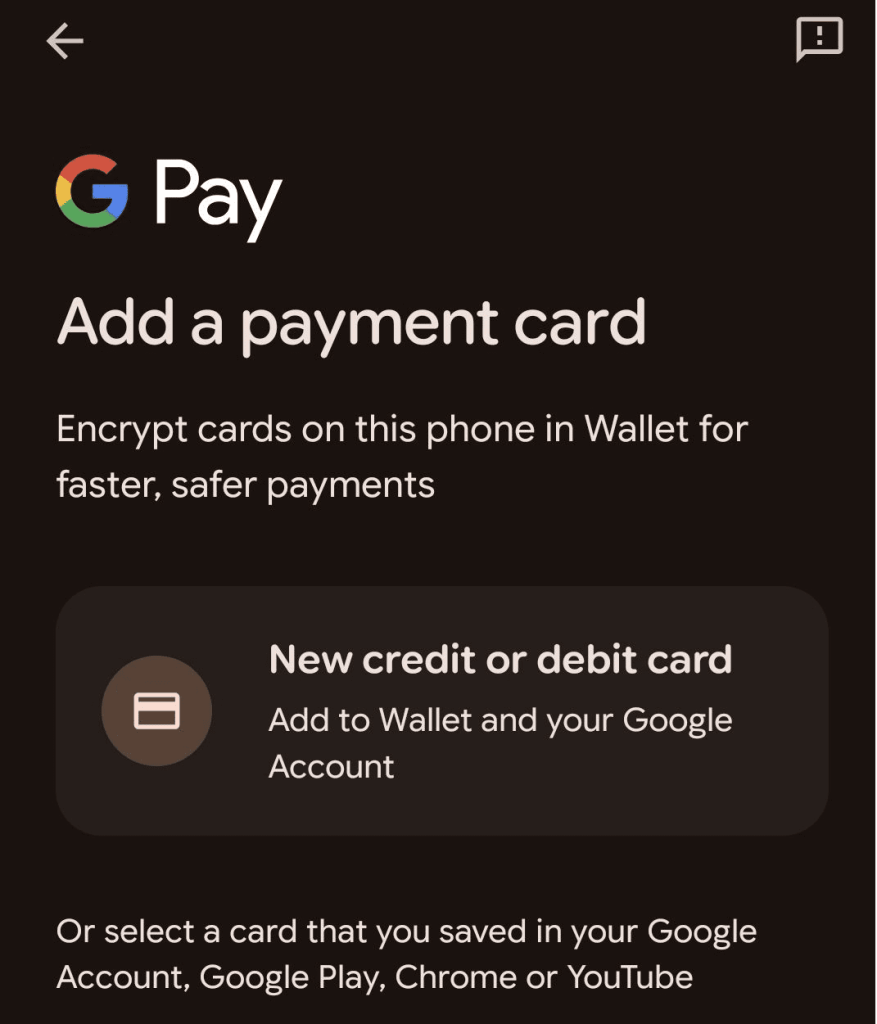
Step 3: Select “New credit or debit card”, scan or type your card details manually.
Takes 30 seconds. Accept your bank’s terms, then verify through your bank’s mobile app or SMS one-time password.
HSBC users verify through HSBC Mobile Banking using fingerprint or PIN. Maybank users can add cards through the MAE app using Secure2u. Hong Leong Bank (HLB) also supports adding Visa cards via the HLB Connect App. If verification fails, check your bank details to make sure it matches your Google account exactly.
What Are The Transaction Limits?
RM250 per transaction without PIN, set by Bank Negara Malaysia. Anything above triggers a PIN request at the terminal. Banks stack additional daily limits on top. Your bank’s daily cumulative limit resets at midnight or immediately after you perform a chip-and-PIN transaction. Physically insert your card into the terminal and complete any transaction using your PIN (a chip-and-PIN transaction). This acts as a security check that immediately clears your daily contactless counter.
How Do You Pay With Google Pay?
Make sure your Google Wallet is set as your default payment app and your phone needs NFC switched on (“Connected devices” in settings). Wake your phone, hold it near the terminal, wait for the checkmark. Google Pay activates automatically. The phone must be unlocked to authorise payment. Hold steady for a second, until you hear a beep.
Is It Actually Safe?
Yes, Google Pay never shares your real card number with shops. When you add your card, it creates a fake substitute number that only works on your phone.
How Tokenisation Works (The Security Layer)
This security is managed by the Token Service Provider (TSP) — an entity run by the card networks (like Visa and Mastercard), which acts as a secure translator:
When you set up Google Pay, the TSP gives your phone a fake, secret card number (the token).
When you pay, the shop only sees this fake number.
The TSP is the only one who knows how to link that fake number back to your real bank account for payment authorisation.
Every payment generates a temporary, unique code that expires immediately. If hackers steal data from a shop’s system, they only get useless fake numbers. You can add the same card to multiple phones, and each device gets its own unique token. You must set a phone lock (PIN, pattern, fingerprint, or face recognition) before adding cards.
Why Won’t Your Card Add?
Your phone might be modified or hacked. Google blocks phones that have been tampered with (jailbroken Android phones or custom software). Check if your phone is certified: open Play Store, tap menu, go to Settings, look for “Play Protect certification”.
Try this fix: go to your phone settings, find Google Wallet, tap “Clear cache” and “Clear data”, restart, try again. Do the same for Play Store. The card itself might not be eligible. For credit card eligibility, check the RinggitPlus credit card page, but remember, your bank is the final authority for all card types.
Your name and address at payments.google.com must match your bank records exactly. Expired cards won’t add.
Google Pay is currently designed only for Android devices in Malaysia and requires Google Play Services. iOS users must use Apple Pay.
Do You Still Get Your Credit Card Rewards?
Yes, every reward point, cashback sen, and privilege applies. Google Pay transactions process identically to physical card payments.
The payment system recognises the link between the token (which you pay with) and your actual account (which earns the rewards), so calculations are applied normally.
Maybank users earn the same points, CIMB gets standard cashback, Hong Leong accumulates normal rewards. Google Pay adds no extra fees.
Payment Not Working At The Terminal?
Check NFC is on and Google Wallet is your default payment app. Unlock your phone before tapping. Hold steady for two seconds. You might have maxed out your bank’s daily contactless limit even if this transaction is under RM250. Insert your card and enter PIN to reset, or wait until tomorrow. Check that the merchant accepts contactless.
What If There’s A Dodgy Charge?
Ring your bank immediately for unauthorised charges on your card. For charges related to Google products like Play Store purchases, report directly to Google through their online complaint form with transaction ID, date, amount, and explanation. Google Payment Malaysia must acknowledge within one business day and respond within 60 days.
Not happy with their response? Escalate to the Ombudsman for Financial Services. They handle disputes up to RM250,000 (RM25,000 for unauthorised Google Pay transactions specifically). File within six months of Google’s final response.
Does Google Pay Work Overseas?
Yes, anywhere that accepts contactless payments, if your card has overseas transactions enabled. Activate through your bank’s mobile app first. Maybank uses MAE app or ATM, CIMB uses CIMB Clicks or Octo app, Hong Leong uses HLB Connect.
The RM250 limit applies internationally (converted to local currency). Your bank’s foreign transaction fees, typically 1-3%, still apply. Wise cards offer mid-market exchange rates and RM1,000 free ATM withdrawals monthly.
Lost your phone? Remotely lock or erase it using Android’s Find My Device. Your real card number stays safe, and physical cards work normally. Ring your bank if you suspect fraud before you lock the device.
Google Pay works once you understand the limits and quirks. Most problems come from hitting daily spending caps or modified software. Get your card added properly, keep your phone certified, and you’ll tap through checkout queues faster than fumbling for your wallet.
Christina writes about personal finance with an eye for making the complicated feel straightforward. She is drawn to the everyday money decisions people face and genuinely enjoys finding the clearest way to explain them. Between articles, she is probably napping, on a hiking trail, or terrorising her sister’s cats.
51vote
Article Rating
SHARE
About THE AUTHOR
Christina Chandra
Christina Chandra
Christina writes about personal finance with an eye for making the complicated feel straightforward. She is drawn to the everyday money decisions people face and genuinely enjoys finding the clearest way to explain them. Between articles, she is probably napping, on a hiking trail, or terrorising her sister's cats.








Comments (0)