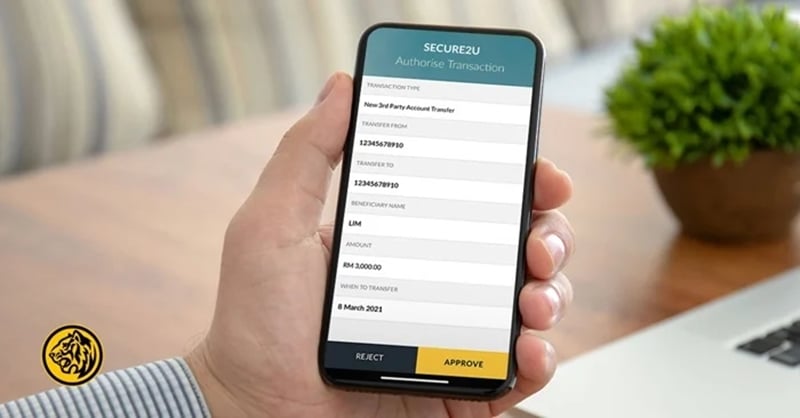
Secure2u is Maybank’s replacement for SMS TAC. Instead of waiting for a 6-digit code to arrive via text message, you approve transactions directly through the MAE app on your phone.
Secure2u links your Maybank2u account to your specific device. Even if someone gets your username and password, they can’t approve transactions without your physical phone. SMS codes, by contrast, can be intercepted through SIM swapping scams or phishing attacks.
Secure2u offers stronger protection against online banking fraud, addressing one of the most common ways scammers steal money from Malaysian bank accounts: SMS interception. Transaction approvals are also faster since you’re not waiting 30 seconds for an SMS to arrive, since Secure2u notifications appear instantly. The approval process itself is simpler too. You tap “Approve” on the push notification and you’re done.
How To Activate Secure2u (Step-by-Step)
Setting up Secure2u takes about 15 minutes, plus a mandatory 12-hour waiting period. You’ll need your Maybank debit or credit card (compare Maybank card options if you don’t have one yet) and access to a Maybank ATM.
Step 1: Register on the MAE App
Download the MAE app from Google Play or the App Store.
Open the app and tap Secure2u under Quick Actions.
Tap Activate Now.
Enter your mobile number and the OTP sent to you.
Enter your IC number and confirm your device name.
At this point, Secure2u is registered but not yet active. You’ll get a notification telling you to visit a Maybank ATM to complete activation.
Step 2: Activate at a Maybank ATM
The ATM visit is mandatory. This step verifies that you physically own both the phone and the card, preventing scammers from remotely activating Secure2u on stolen accounts.
Insert your Maybank debit or credit card.
Key in your PIN.
Select Secure2u Activation from the main menu.
Choose Activate Secure2u and follow the prompts.
You’ll get a confirmation message on the ATM screen and in the MAE app.
Step 3: Wait Out the 12-Hour Cooling-Off Period
After ATM activation, there’s a 12-hour waiting period before you can use Secure2u to approve transactions. You can still log in to Maybank2u, but you won’t be able to complete transfers or payments during this time.
This cooling-off period is a fraud prevention measure. If someone activates Secure2u on your account without your knowledge, you have 12 hours to notice and report it before they can move your money.
Which Transactions Require Secure2u?
Maybank has moved almost all transaction approvals to Secure2u. You need it for:
Fund transfers: Third-party transfers, Interbank GIRO (IBG), and DuitNow.
Bill payments: JomPAY and direct biller payments through Maybank2u.
FPX payments: Online shopping checkouts where you select Maybank2u as your payment method (Shopee, Lazada, etc.).
Account changes: Increasing your transfer limits or updating personal details.
You can no longer approve these transactions through the older M2U MY app. Secure2u only works through MAE.
Can I Use Secure2u On Multiple Devices?
No. Secure2u works on one device at a time.
This is deliberate. By limiting approvals to a single phone, Maybank reduces the number of potential entry points for scammers. If you activate Secure2u on a new phone, it automatically deactivates on your old one.
What If I Lose My Phone?
Losing your phone means losing access to Secure2u, which blocks your ability to approve transactions. That’s actually good from a security standpoint, but you need to act fast to protect your account.
Call Maybank immediately. Contact the Fraud Hotline at 03-5891 4744 or Customer Care at 1-300-88-6688. They can temporarily suspend your online banking access.
Use the Kill Switch. If you have access to a computer, log in to Maybank2u on the website. Go to Settings > Security > Kill Switch and deactivate your M2U access. This instantly blocks all transactions.
Once you have a replacement phone, you’ll need to reactivate Secure2u from scratch—app registration, ATM visit, and another 12-hour wait.
Troubleshooting Common Issues
No push notification appearing? Open the MAE app manually. Check the notification bell icon or tap the Secure2u button under Quick Actions. Your approval request should be waiting there.
“Device Not Compatible” error? Update your phone’s operating system. MAE requires relatively recent versions of Android and iOS to function properly.
App won’t install on rooted/jailbroken devices? Secure2u doesn’t work on modified devices. This is a security feature, not a bug. You’ll need to use an unmodified phone.
Secure2u activated, but transactions still fail? Make sure you’ve waited the full 12 hours after ATM activation. Check that you’re using the MAE app, not the old M2U MY app.
Getting Started
The ATM requirement and 12-hour wait feel like hassles, but they’re effective barriers against the account takeover scams that cost Malaysians millions each year. By tying your transaction approvals to your physical card and phone,
Maybank makes it significantly harder for scammers to drain your account remotely. If you haven’t set up Secure2u yet, do it now before you actually need to make an urgent transfer. Better to wait out the 12 hours on your own schedule than when you’re trying to pay for something time-sensitive.
Download the MAE app, follow the steps above, and you’ll be ready to go.
Follow us on our official WhatsApp channel for the latest money tips and updates.
As a creative content writer, Eloise has covered finance, business, lifestyle topics, and even moonlights as a singer-songwriter outside of RinggitPlus. Her current interests are learning the best ways to optimise spending and credit card hacks to gain more airline miles.
00votes
Article Rating
SHARE
About THE AUTHOR
Eloise Lau
Eloise Lau
As a creative content writer, Eloise has covered finance, business, lifestyle topics, and even moonlights as a singer-songwriter outside of RinggitPlus. Her current interests are learning the best ways to optimise spending and credit card hacks to gain more airline miles.







Comments (0)