Alex Cheong Pui Yin
Previously covered recruitment-related stories and had a short stint as a copywriter for the property industry. She subsequently developed an interest in investment and robo-advisors.

17th February 2020 - 3 min read
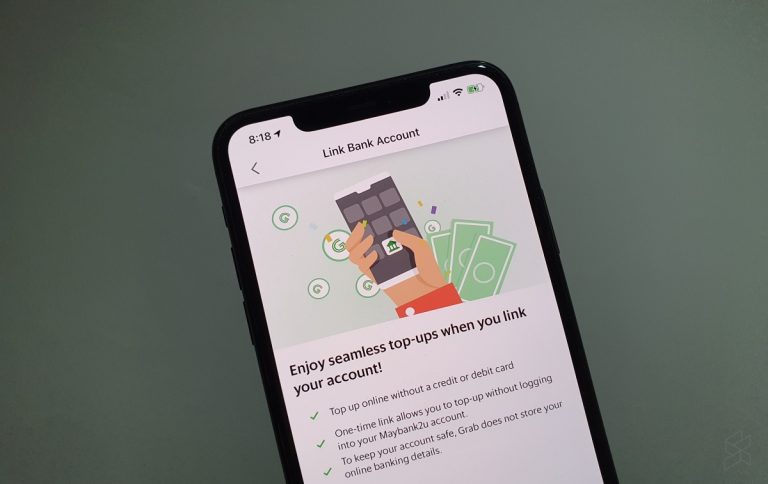
(Image: SoyaCincau)
Grab has enabled Maybank2u as a new top-up source for the GrabPay e-wallet. Interestingly, it is more than just a simple bank account linking, but a pretty tight integration between Maybank2u and GrabPay.
This can be seen by the seamless reload process: once your bank account is linked to GrabPay, you will no longer need to log in to your Maybank2u account and wait for a verification code every time you want to top up your GrabPay. Instead, future top-ups just needs you to key in the amount that you wish to top up, and then hitting the “Top Up” button.
The process of linking your Maybank2u account to GrabPay is fairly simple. Here’s a step-by-step guide:

Perhaps due to this tight integration and seamless reload process, you will have to determine how long you’d like to keep your Maybank account linked to your GrabPay wallet. You get to choose from three options: 3 months, 6 months, or 12 months. Additionally, you can set a daily top-up limit.
You’ll also notice that aside from your Maybank bank accounts, there is an option to link your GrabPay to a Maybank Anytime Everyone (MAE) account. The MAE account is basically Maybank’s e-wallet that is based on a virtual bank account instead of your savings or current account.

Once you’ve confirmed your preferences, you will be sent a TAC for verification. Key it in to validate your transaction, and you’re good to go! If you’d prefer, you can also enable the Auto Reload function with your linked Maybank2u account.
To unlink your GrabPay from your Maybank2u account or change certain settings, you can do so from the Maybank2u website on your desktop. Simply head to “My Settings”, then “Pay & Transfer”, and access “Linked Accounts”. This is where you can change your preferences for GrabPay, or remove the e-wallet’s access to your bank account.
While this new feature makes it a lot more convenient to add funds to GrabPay, it eliminates the possibility of earning more rewards for using GrabPay. Reloading e-wallets using certain credit cards allow you to double-dip on rewards offered by both Grab (GrabRewards points) as well as the specific credit cards’ benefits (cashback or rewards points).
(Source: SoyaCincau)
Previously covered recruitment-related stories and had a short stint as a copywriter for the property industry. She subsequently developed an interest in investment and robo-advisors.



Comments (0)